| Presentation Method: | ||||||||
| In the conference, only the LCD projector can be used.The overhead projector (OHP) can not be used. | ||||||||
| Presentation Slides: | ||||||||
|
Reference to the site of IS&T
(http://www.imaging.org/ist/conferences/guide_present/index.cfm ), Please make the slide with the legible style for audience. | ||||||||
| Presentation Time: | ||||||||
Presentation time allotted for each type of paper is as follows. Please check your presentation time and keep to it in order to conduct the program smoothly.
| ||||||||
| Interactive Paper Presentation | ||||||||
|
The size of your poster area is 1.0 m high x 1.3 m wide. Please refer figures below. Your poster and/or other materials have to be on display by 12:50. 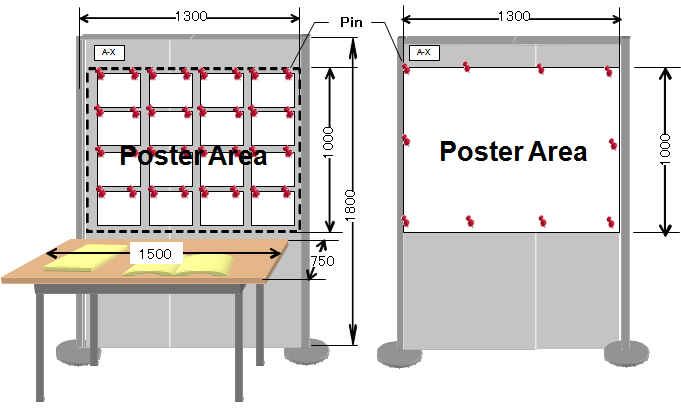 | ||||||||
| Prior to your presentation: | ||||||||
|
In the conference, both of your own laptop and the PC for common use which we prepare (Windows 7/Powerpoint 2010) are available. Please check the motion of your laptop computer or behavior of your presentation slide at your conference room before the session begins (as soon as possible). In order to cope with the case in which there would be any problem with connection or display, please prepare your presentation file backup on USB memory or CD-R. In the non-stop presentation of interactive papers, the session's laptop computer (Windows 7/ Powerpoint 2010) is used. Please bring your presentation file stored at USB memory or CD-R and set into the session's laptop computer before the first session of the day. (Please contact the AV chair, when you arrived the conference registration desk). When you use the PC for common use, please save your slide file under the name as follows;
S-P_author.ppt
[ S: Session identification, P: Paper number Example: A-28_Nagayama.ppt |