| This page is to provide speakers and authors some guidelines for producing effective presentation at the Imaging conference JAPAN 2014. We include some rules to handle your presentation data file. | ||||||||
| Presentation Method: | ||||||||
| In the conference, only the LCD projector can be used.The overhead projector (OHP) can not be used. MS Power Point (.ppt or .pptx) is installed in the conference PC. Please prepare a copy of your presentation file converted to PDF against unexpected error. | ||||||||
| Presentation Slides: | ||||||||
|
Reference to the site of IS&T
(http://www.imaging.org/ist/conferences/guide_present/index.cfm ), Please make the slide with the legible style for audience. | ||||||||
| Presentation Time: | ||||||||
Presentation time allotted for each type of paper is as follows. Please check your presentation time and keep to it in order to conduct the program smoothly.
| ||||||||
| Interactive Paper Presentation | ||||||||
|
The size of your poster area is 1.0 m high x 1.2 m wide. Please refer figures below. Your poster and/or other materials have to be on display by 13:00 on June 11. A desk (1.5m width, 0.75m depth) is prepared if you request it on ahead. 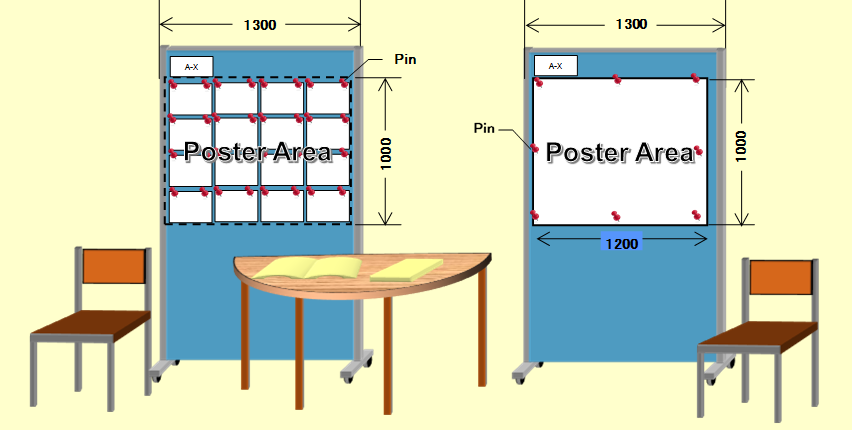 | ||||||||
|
Your poster is requested to be on display till 13:00 on June 13, the final day of the conference. If you or your colleagues cannot pick up your poster by yourself, please trust to the ICJ committee for its properly disposition. The "Best Poster Award" and "Editorial Chief Award" will be judged and commended in the "Social Hour"on the day. Poster presenters are requested to join the Social Hour to be nominated the award. The participation fee is exempted for the poster presenter. "Editorial Chief Award" winner is requested to revise the presentation to submit a paper to the ISJ journal. | ||||||||
| Prior to your presentation: | ||||||||
|
In the conference, the oral speaker can use your own laptop or the confrence PC for common use (Windows 7/Powerpoint 2013). Please check the motion of your laptop computer or behavior of your presentation slide at your conference room before the session begins (as soon as possible). In order to cope with the case in which there would be any problem with connection or display, please prepare your presentation file backup on USB memory or CD-R. For the non-stop presentation of interactive papers, only the conference PC (Windows 7/ Power point 2013) is available. Please bring your USB storage or CD-R to the AV registation desk and install it to the conference PC during 9:00 to 10:00am of the first day. (Please contact the AV chair, when you will check in at the conference registration desk). Please decontaminate your USB device before you plug it into the conference PC. When you install your file to the conferene PC, please name your presenation file as follows;
S-P_author.ppt
[ S: Session identification, P: Paper number Example: A-28_Nagayama.ppt |