| Presentation Method: |
| In the conference, only the LCD projector can be used.The overhead projector (OHP) can not be used. |
| Presentation Slides: |
| Referring to the site of IS&T ( http://www.imaging.org/resources/vcguide/index.cfm ), please make the slide with the legible audience. |
| Presentation Time: |
|
The amount of time allotted for each type of paper is as follows. Please check your presentation time and keep to it in order to conduct the program smoothly.
[General Papers]
20 minutes (includes 5-minute Q&A time)
[Invited Papers]
Keynote Speech: 50 minutes (includes 5-minute Q&A time)
Business Session: 45 minutes (includes 5-minute Q&A time) Topical Session: 25 or 40 minutes (includes 5-minute Q&A time) Commemoration Lecture of Paper Award and Konica Minolta Research Encouraging Grant: 30 minutes (includes 5-minute Q&A time) [Non-stop Presentation for Poster Papers (oral preview)]
6 minutes (without Q&A time)
When your oral preview is passed through the time of the schedule, your presentation would be immediately finished. Please make the slides for non-stop presentation, which arranged the lecture outline, especially, emphasized the introduction part. The presenters don’t have any Q&A time in non-stop presentation. For the discussion of poster paper, the sufficient time (230 minutes) is scheduled after the lunch time from 13:00 to 16:50. Each presenter is expected to stand in front of his or her poster for explanation and discussion from 14:00 to 16:00. |
| Poster Paper Presentation |
|
The size of your poster presentation area is 1.0 m high × 1.8 m wide. Please see below. Your poster and/or other materials have to be on display by 12:50. 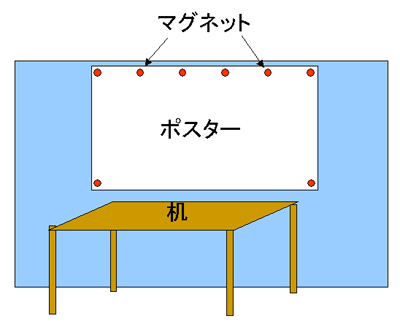 |
| Prior to your presentation: |
|
In the conference, both of your own laptop and the PC for common use which we prepared (windows XP/powerpoint 2003) are available. Please check the working your laptop computer or action of your presentation slide, before the session begins (as soon as possible). In order to cope with the case in which there is a problem for connection and display, please bring your presentation file stored at USB memory or CD-R. In non-stop presentation of poster papers, the session's laptop computer (windows XP/powerpoint 2003) is used. Please bring your presentation file stored at USB memory or CD-R and set into the session's laptop computer by 9:40 am. (Please contact the AV chair, when you arrived the conference registration desk).
When you use the PC for common use, please make the name of your slide file as follows:
S-P_author.ppt
[ S: Session identification, P: Paper number Example: A-28_Nagayama.ppt |